Makerspace
Welcome to the TWU Residential Makerspace!
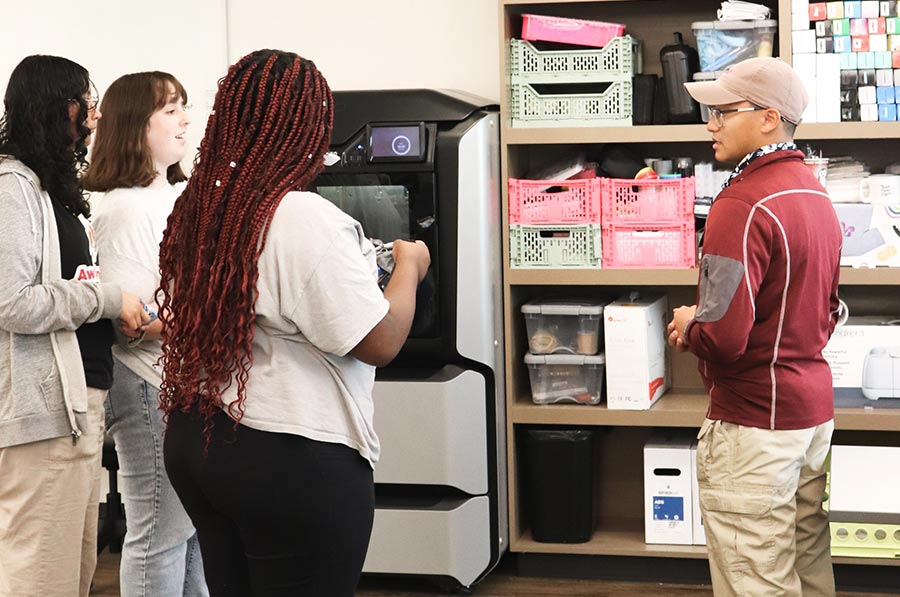
The Makerspace provides professional equipment to foster a collaborative, hands-on environment for residents to learn and create. With state-of-the-art tools and equipment, residents have resources to support a wide range of projects.
/prod01/twu-cdn-pxl/media/images/housing/Laser-Cutter.jpg)
Our makerspace features a powerful laser cutter that can precisely cut or engrave various materials such as wood, acrylic, leather, and more. With this tool, you can bring intricate designs to reality and add unique details to your projects.
Materials must be approved before use to ensure safety. We will have some materials available in the makerspace, but can also assist in determining where to purchase other approved materials.
Model: PLS 6150 Laser Engraving System
/prod01/twu-cdn-pxl/media/images/housing/3D-Tools.jpg)
We have two high-quality 3-D printers available for use. These printers allow you to transform your digital designs into physical objects using a variety of materials. From prototypes to artistic creations, the possibilities are endless. Residents are encouraged to bring their own print files, or can be advised by Makerspace staff for recommended vendors.
Model: Stratasys F170
Supports ABS and PLA Printing
Our makerspace hosts a 3D scanner capable of scanning quick, textured, and accurate 3D models of medium-sized objects. This tool is useful for fabrication and 3D modeling objects you already have.
Model: Artec Eva
/prod01/twu-cdn-pxl/media/images/housing/Anatomy-Model.jpg)
For students studying anatomy or conducting research in the field of biology, we have a SynDaver Anatomy model available. The SynDaver Anatomy Model includes major skeletal, muscular, and some of the cartilaginous structures present in typical human anatomy. It is a full-sized, head-to-toe anatomical model. This model provides a detailed representation of the human muscular system, allowing for in-depth exploration and study.
/prod01/twu-cdn-pxl/media/images/housing/Cricut_Makerspace_Photo.jpg)
The Cricut Maker 3 and EasyPress allows residents to quickly cut 300+ materials, and is perfect for working with vinyl and paper based projects. The Makerspace is equipped with add-on tools for perforation, debossing, foil transfer, and more.
The Makerspace has a limited amount of Cricut-compatible materials available for resident use. Please contact the Makerspace before purchasing project materials to ensure equipment compatibility.
Explore the Makerspace
Whether you're a seasoned maker or just starting your journey, the Makerspace offers a supportive and collaborative environment. Here are a few key points to note:
- Access: The Makerspace is only open to students living in official TWU Housing and Dining Communities, by appointment.
- Hours: Office hours are Monday through Friday, 9 am-5 pm.
- Workstations: Please see below for a full list of the Makerspace’s tools and equipment.
- Staff and Support: The Makerspace’s friendly and knowledgeable staff members are available to provide training, guidance, and troubleshooting assistance on your projects. Please emailat TWU Makerspace for any questions.
Come join us at the Makerspace, where creativity, innovation, and hands-on learning converge. Unleash your imagination and bring your ideas to life with the tools and resources we offer. Let's make something amazing together!
Workstations
swipe to see the full table⇨
| Supplies & Equipment | Details |
|---|---|
| Stratasys F170 3D Printer |
|
| PLS 6150 Laser Engraving System |
|
| Artec Eva Handheld 3D Scanner |
|
| SynDaver Life-Size Anatomical Model |
|
| Cricut Maker 3 & Cricut EasyPress |
|
| Fiber Arts Supplies |
|
| Jewelry Making Supplies |
|
| Leather Working Kit |
|
| Dremel 4300-5 Rotary Tool |
|
| Soldering Iron |
|
| Art Supplies |
|
Frequently Asked Questions
What is the Texas Woman's University Makerspace?
The Texas Woman's University Makerspace is a dedicated creative space on campus that provides students and faculty with access to tools, equipment, and resources to engage in hands-on making, prototyping, and innovation.
Can I ask the Makerspace staff to create new projects for me?
We love partnering with Housing staff and other TWU departments on creative projects that support our residential students! Makerspace staff are here to collaborate, offer guidance, and help you make the most of our space and resources. Please note that while we assist and support, we do not create projects on behalf of others. If materials are used for projects outside of Housing student initiatives, the department will be responsible for covering material costs.
Where is the makerspace located?
The Makerspace is located on the Texas Woman's University campus in Parliament Village. You can find us right next to the computer lab in Mary’s Hall, Room 123.
For residents who do not have ID access to Parliament Village, please call the Makerspace at 940-898-3096 to gain entry for your appointment.
Who can use the Makerspace?
The Makerspace is open only to residential students.
What equipment and tools are available in the Makerspace?
The Makerspace is equipped with a variety of tools and equipment, including Stratasys 3-D printers, a ULS laser cutter, an Artec Eva 3-D scanner, a Cricut Maker 3, and a VEVOR ultrasonic cleaner.
Please read ‘Workstations’ for a full list of tools and equipment.
How can I get access to the Makerspace?
To use the Makerspace, please schedule an appointment using this form.
Do I need prior experience or knowledge to use the Makerspace?
No prior experience or knowledge is necessary. The Makerspace staff will provide training and guidance on how to safely and effectively use the equipment and resources available.
Are there any costs associated with using the Makerspace?
Use of the Makerspace is free for Texas Woman’s University residential students. Most projects are free, but are subject to a case-by-case determination based on material costs.
Can I bring my own materials for my projects?
Residents are welcome to bring their own materials for their projects. Please contact the Makerspace staff before purchasing any materials. Approval is needed from Makerspace staff prior to an appointment to ensure the compatibility and safety of materials with our equipment.
How can I get assistance with my project or technical issues?
The Makerspace staff is available to provide guidance, support, and assistance with projects by appointment. Residents can also reach out to the Makerspace at makerspace@twu.edu, or by calling 940-898-3096.
Contact Us
If you have any further questions or need more information, don't hesitate to contact the Texas Woman's University Makerspace staff. They will be happy to help!
Email TWU Makerspace
940-898-3096
Page last updated 8:02 AM, October 23, 2025